Anatomy of Clutter

It’s always curious to me how and why clutter accumulates. I’m envious of those people who seem to keep their surfaces clean and free of clutter effortlessly. I can attain this standard for short bursts of time, but it requires huge efforts and constant vigilance on my part. Otherwise the piles grow until I reach a tipping point.

Over the past couple of weeks I’ve been attacking the accumulations of clutter and stagnant build up. The neglected piles of paper that need to be dealt with, tossed, filed, or scanned and then tossed. Random collections of stuff that I seem to gather in bags and pockets as part of my day-to-day living. Things stashed in a corner somewhere to be tackled when I have more time or more energy. Or that have to wait for something else to happen before I can take action.

When I go on one of these binges, I have a few strategies that help keep me motivated and get me over the hump.

Firstly, I’m always curious to learn more about my habits and assess why build up seems to be happening in a certain place (see Clearing Out Clutter) or with a particular type of stuff. I like to observe, without judgement or criticizing myself, as a way to understand more about the root causes of the problems so I can figure out better systems. (Read Diagnosing Bad Habits to learn more.)

Secondly, I’m always striving to increase my efficiency, especially with tasks that I don’t enjoy doing like going through piles of papers. If I can figure out how to deal with something fully the first time I touch it, that’s a big accomplishment and ultimately helps in reducing the clutter build up.

For example, paper receipts are always part of the landscape. This indicates to me that I need a better system for processing receipts quickly. I need to have set criteria about which ones to save and for how long. I also need a place to save them that is easily accessible. Once I have the guidelines established and a system for managing the receipts, I can process them faster. Now, when I go through my daily collection of receipts, I have a quick method for processing them.

For more strategies and tips, check out posts on Spring Cleaning, Productivity, or Deletion (electronic build up).
Working the Gig Economy: Bicycle Food Delivery

Two summers ago my partner and I spent a few months doing bicycle food delivery for companies such as Just Eats, Uber Eats, and Door Dash. As a fresh grad, my partner was looking to pick up some quick cash to supplement his full-time job with something he could do on his own hours. It was really the kind of job that could only exist in today’s modern world by using a smart phone equipped with an app, location tracking, and a robust data plan.

It was his gig, but I was curious about how the process worked so we had “delivery dates.” Typically I rode in front to navigate from pick-ups to deliveries. He carried the food in a giant, insulated backpack. As the novelty wore off for me, our dates dwindled down to once a week. We had a good time all summer discovering the city on our bikes, getting exercise, learning about new restaurants, and making money. We were in great shape! Plus we learned a lot about working together as a team.

I hadn’t thought too much about our time working in the gig economy until I read an article in the New York Times this past weekend, “My Frantic Life as a Cab-Dodging Tip-Chasing Food App Deliveryman.” Reading this article brought back memories, including yes, how dangerous it could feel to be moving fast, under pressure on a bicycle in traffic, competing with other bicycle delivery people, and in adverse weather conditions.

After reading Andy Newman’s (journalist) sometimes harrowing time delivering, it brought back some negatives about the experience. The work was hard with terrible pay. The companies constantly incentivized us to work more by promising bonus pay if a certain number of deliveries were completed in a specific time frame, while achieving a rating of almost 5 stars. UberEats could send us up to 4kms in any direction to make a delivery, making it difficult to finish them quickly and increase earnings.

Towards the end of the article, Newman recalls something from one of his interviewees that the real value of the deliveryperson is all the data collected by the hiring companies so that this work can eventually be replaced by machines.

I have mixed feelings about being replaced by machines, but having experienced the negatives of this gig economy, I would probably welcome a drone dropping off my order.

Iceland: Gullfoss and Faxifoss

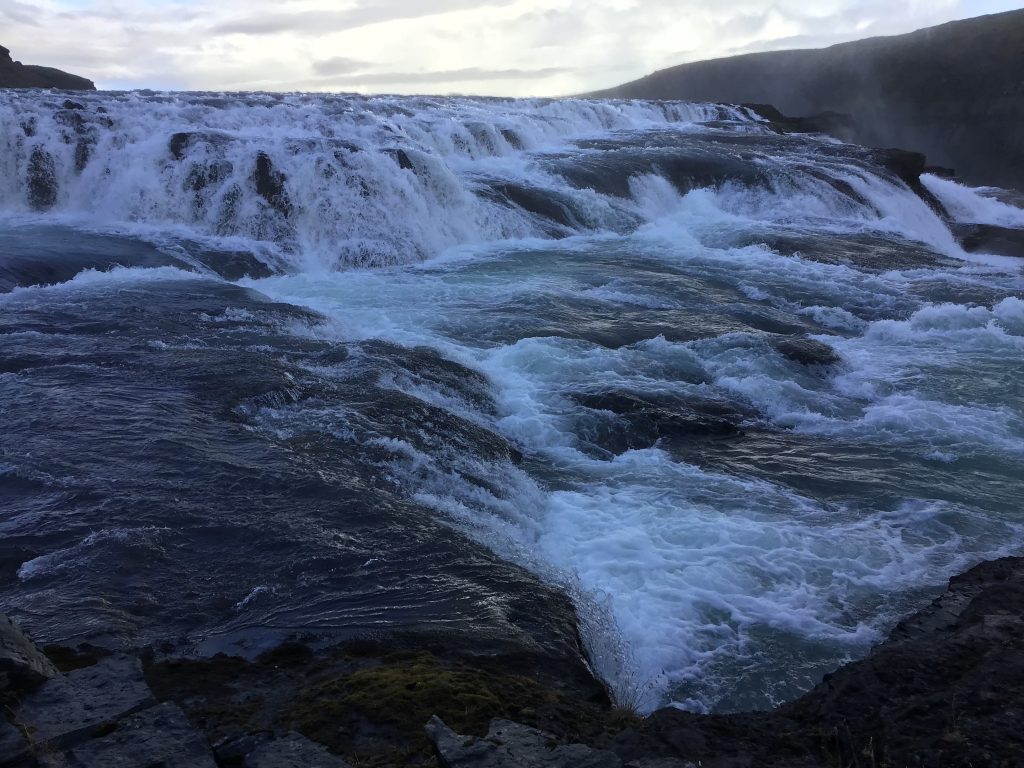
After a morning spent traipsing through Thingvellir National Park and watching geysirs, we ended the day with waterfalls. Iceland is full of waterfalls, but I never tired of seeing them.

I loved watching the force of the falls and hearing the loud swishing noise of the water rushing past. I enjoyed feeling the mist on my skin, even when it was already wet and damp outside.

Close up of Gullfoss.

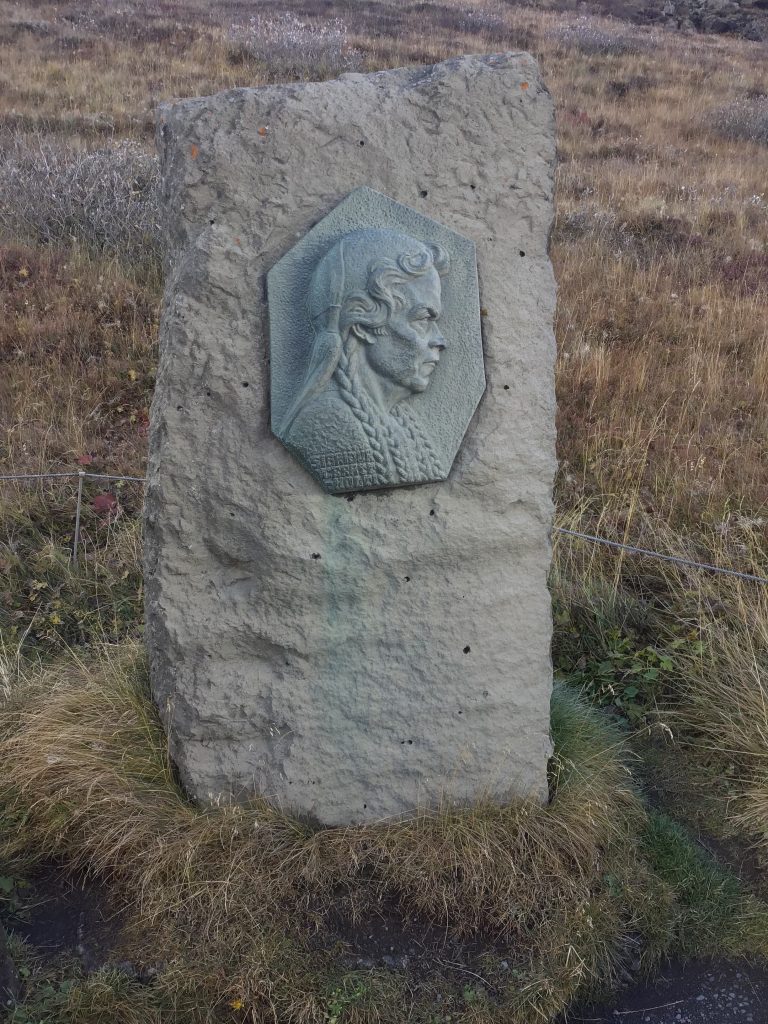
The famous Gullfoss was not my favorite, but I could see why it attracts so many visitors. Gullfoss literally means “golden waterfall” (gull = gold and foss = waterfall). Before you reach the falls, there’s a statue and plaque to commemorate Sigridur Tomasdóttir, the woman responsible for saving Gullfoss from being sold to a private company that wanted to dam the falls to produce hydroelectricity. She and her sisters loved the falls deeply and created their own paths to show the falls to visitors. Her efforts and commitment eventually led to Gullfoss being protected.

Sigridur Tomasdóttir statue

We were told Gullfoss was named for the many rainbows that appear over the falls when it’s sunny out. The day we went was gray and overcast, but we did get one beautiful rainbow right before we left. My picture of the rainbow is not that impressive so I didn’t display it on this post.

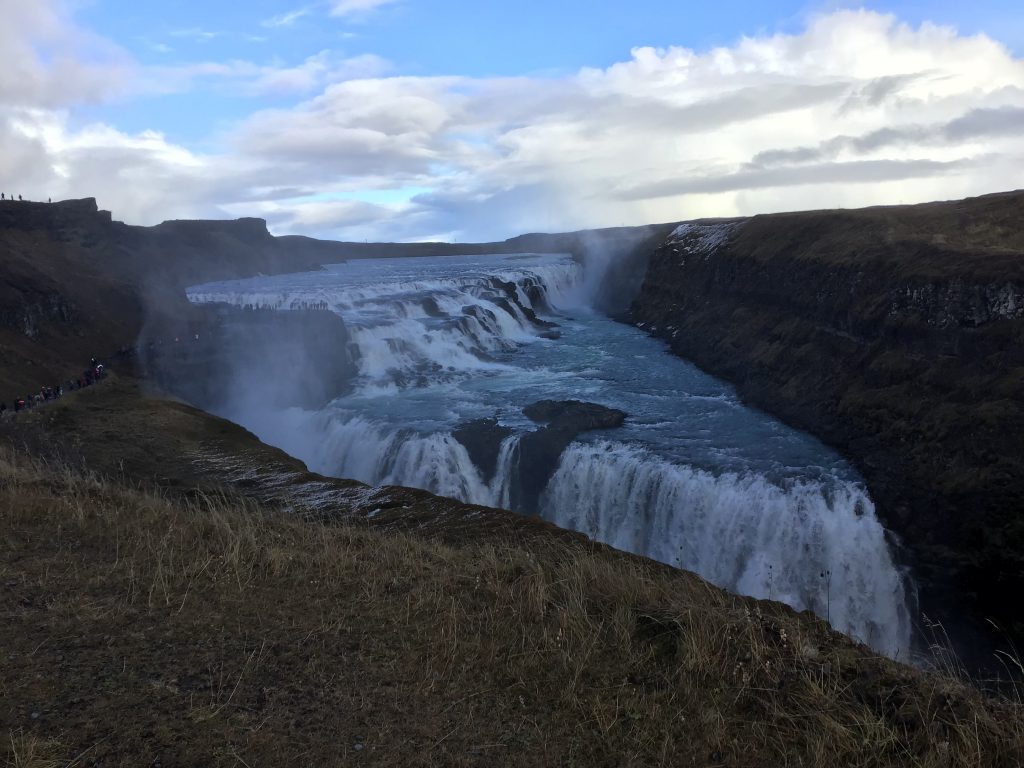
View of Gullfoss from above. It’s hard to get all of it in one frame.

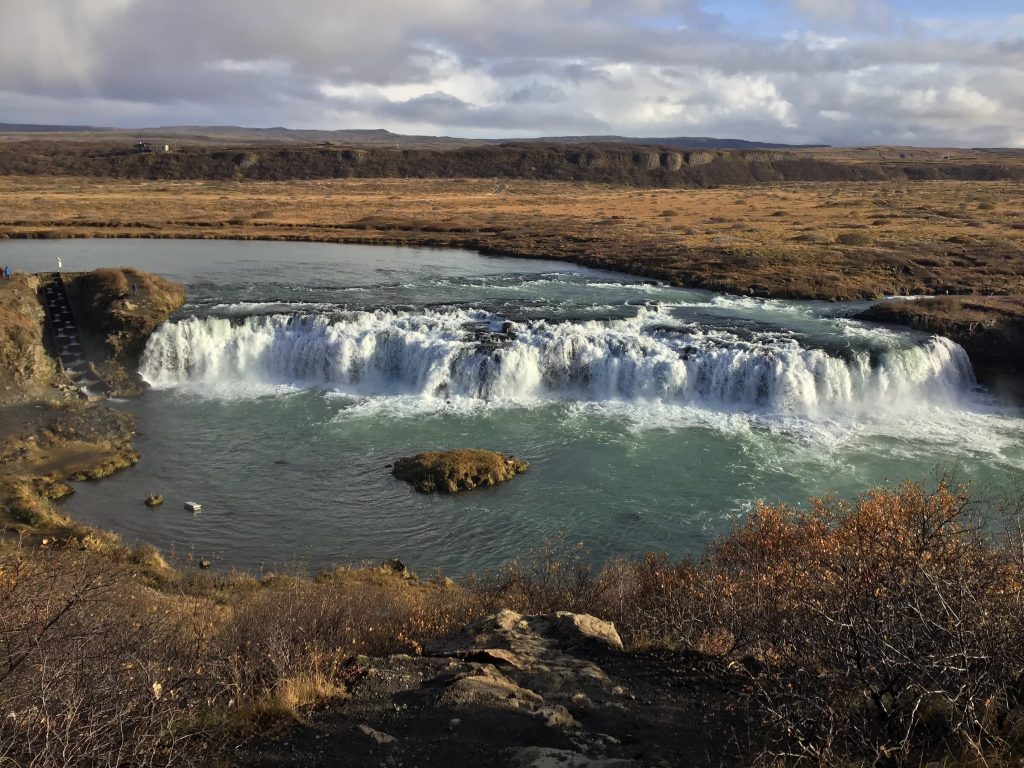
We left Gullfoss and stopped at one last waterfall to end the day. Although this one was smaller than some of the others we saw, I was enchanted by the name even before I saw it. Faxifoss, which means Horse’s Mane Waterfall, was impressive in its own way. It even had a small “ladder” built on the left side of it to help the spawning salmon make it upstream.

Faxifoss – Horse’s mane waterfall

There was another rainbow at Faxifoss, but it was too far away from the falls to get both in the same picture.

Stay tuned for more waterfalls in the southern part of Iceland and an incredible black sand beach with basalt columns. We even got to walk behind one of the falls, Seljalandsfoss!

Location Tracking: How to Protect Yourself

Last week’s post provided an overview of why it may not be a good idea to let apps (and corporations) track your location, anytime, anywhere. Check it out here.

If you’re like me and creeped out by apps collecting unnecessary data about you, especially data that tracks where you are every minute of the day, here are a few things you can try to protect yourself and your privacy.

Tip #1: Restrict Location Tracking Permissions

Go to Settings on your device, which will probably look like a tiny gear.

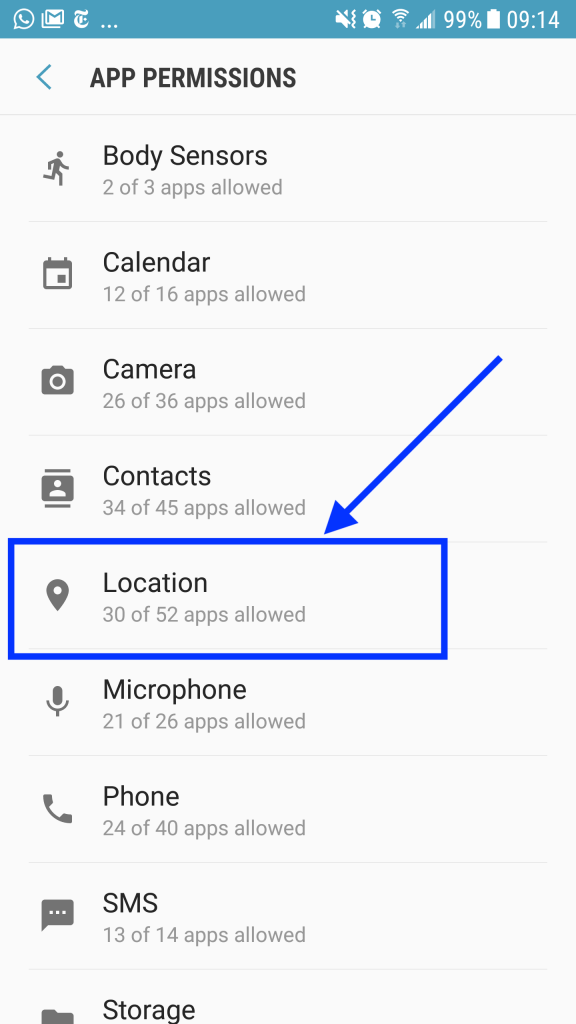
Within settings, look for an APPS menu, which will include options to adjust permissions. Menu options differ slightly on every device, so if you can’t find it, do a quick search to get instructions. (Search for: your device name or operating system AND “disable app permissions”)

I was surprised (and horrified) to see location was allowed on so many apps! After completing this exercise, only 10 apps now have location permissions.

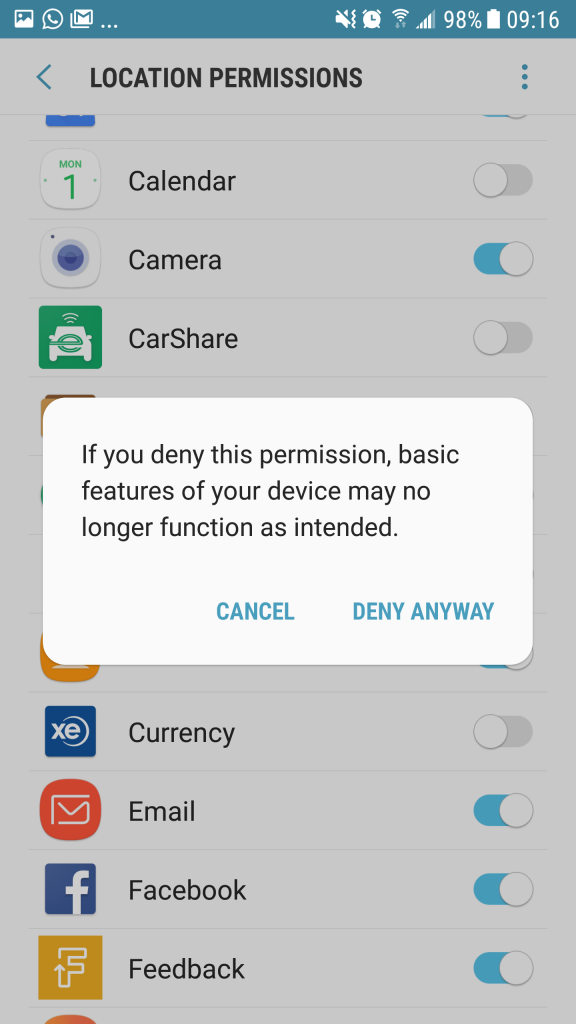
Go through each app and turn off location permissions. Sometimes a warning message appears (see below). Then it’s your choice if you want to disable permissions or not. Or try disabling it and see how much functionality you lose.

Even Facebook, which I’ve never once used on my phone but can’t delete, had locations turned on by default.

Tip #2: Disable Location Permissions through your Browser

I typically use Chrome for searching, even though it’s definitely not the most robust in terms of privacy and security. However, I fool myself into thinking I’m a little safer by using add-ons to block things and by disabling permissions.

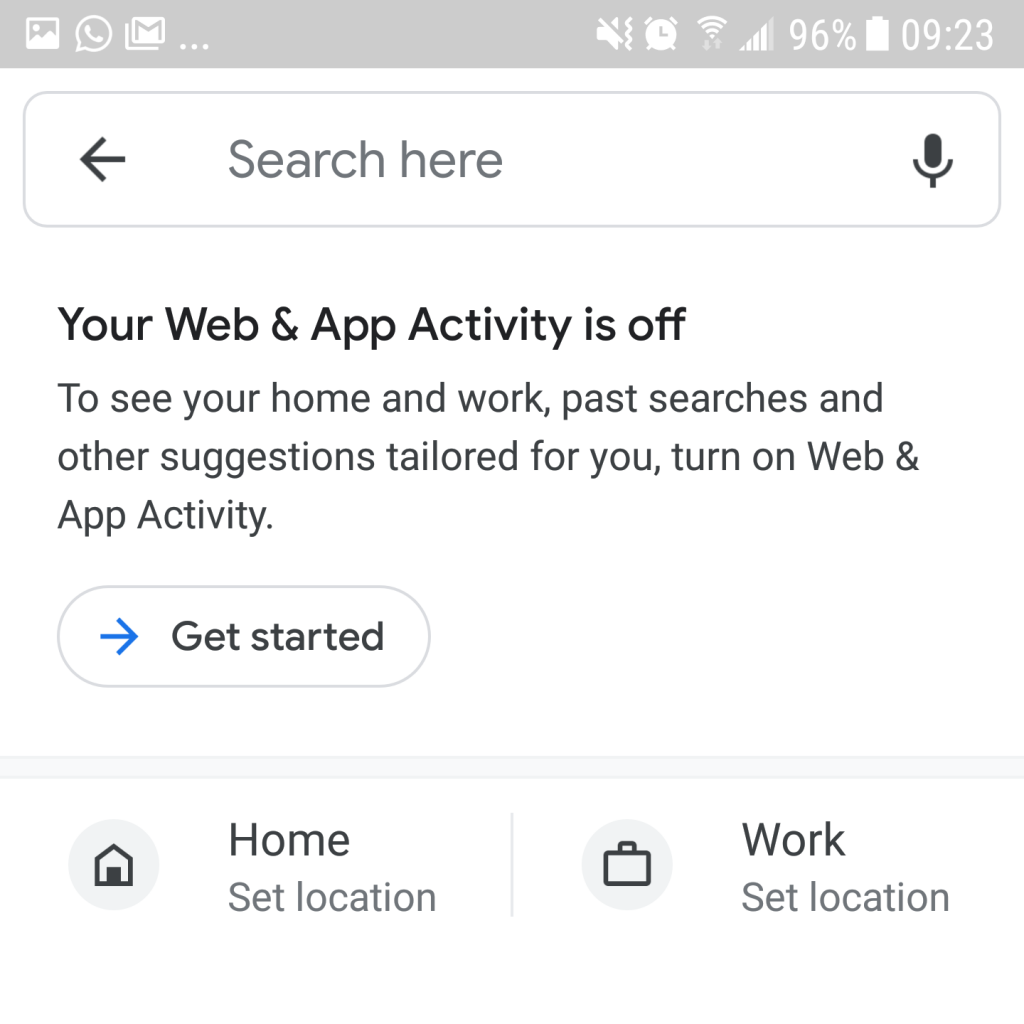
Some years ago I learned that turning off location settings on your phone (the small tear-shaped icon) is not enough to prevent your location from being tracked. You also need to disable Web & App Activity.

I get this message every time I use Google maps to look up an address. It definitely makes the app less convenient to use, but I feel more protected.

Go to settings on your device and look for Google in the menu. Look for Google Account, then Data & personalization. Find “Web & App Activity” and set it to pause.

On your computer, you’ll have to login to your Activity controls.

As mentioned earlier, the options may live in different places depending on your particular device and operating system. And of course if you use a browser other than Chrome, you’ll need to look up instructions.

Here’s a great article from The Washington Post with even more tips, “Help desk: How to fight the spies in your Chrome browser“.

And tips from Google about how to manually delete your location history.

Location Tracking: Convenience or Corporate Surveillance

As a general rule, I always prefer to restrict apps from as many permissions as possible. For many apps, this may result in limited functionality. I’ve posted about this before here.

I always have my location tracking turned off except for when I’m in a new place and I need to know my location to get accurate directions. Or sometimes I turn on location when I’m driving solo and need directions narrated to me.

I was always wary of sharing my location data, even before I started reading about the dangers of this data and how big a commodity it is. First of all, leaving location tracking on depleted my battery faster. But most of all, I didn’t like the idea of being tracked as I went about my daily business, even if I wasn’t doing anything wrong.

Turns out my instincts and paranoia were justified. Some months ago I read a rather chilling article in the New York Times about the how easy it is to identify people from their location tracking. Many of you reading this may be thinking, “What’s the big deal. I’m not doing anything wrong. I’ve got nothing to hide.” This is not true. You may have nothing to hide, but as I’ve written before, you do have something to protect, your privacy and your habits. You may have also been seduced into thinking that the conveniences you get from giving up your location is worth the tradeoff. It’s not.

Some location tracking apps (e.g., browsers, weather, fitness, etc.) record locations every few seconds, all under the guise of providing you better, customized services. This data is then sold to 3rd-party companies who analyze it to learn more about your habits and who you are. Maybe this doesn’t seem offensive if a company is tracking you or it’s something that seems harmless like a weather app.

Now imagine it was a person tracking you instead. You would likely be freaked out by this stalker-type behavior. You wouldn’t know what he was going to do with this information causing you a considerable amount of distress. Aside from the fact it’s just creepy when someone knows where you are every second of the day without your consent (obvious exceptions for knowing where your children are).

Feeling concerned? Stay tuned for next week’s posting and learn how to disarm these location tracking services.

Reruns

Sometime ago I discovered a show that my father used to like on PrimeVideo. I was very excited to discover 8 seasons available for a total of 128 episodes.

In looking at the years each season came out, I realized that my father could have only been alive for part of the first season. And yet, I have such distinct and pleasant memories of sitting and watching the program with him. In fact, I even remember him telling me about this new show and how much he enjoyed it. He encouraged me to watch it.

Sometimes when my mom comes to visit, we’ll sit together and watch a couple of episodes. Of course it’s not the same as having my father in the room, but it creates the illusion of the times we spent together all watching the same thing, at the same time. Laughing, or groaning collectively, at the same parts in the show.

Usually I like to watch it when I’m feeling a little down, or I need some comfort or a light-hearted break for my brain. Even watching it by myself, because honestly it’s the kind of show that most other people don’t enjoy watching, I can still feel that connection. The silent, inherent understanding that my father and I can still appreciate and delight in the same things, even though he’s no longer around physically.

Since most of the shows on cable TV are pretty awful, I do enjoy all the ways I can now watch things on demand. However, I can’t help but wonder if we sometimes miss out on making an effort to watch things together, knowing that it’s so easy to watch something later, on our time, on our own schedules.

Of course one of the big benefits of having things available on demand is that we can coordinate to watch something together, like a movie or show, when it’s convenient for everyone involved. It just seems that finding that suitable time gets harder and more challenging all the time.

It was a long winter and a very long, cold spring in Canada so I was a little sad to notice I’m almost finished with season 7 yesterday. But when I’m done with the whole series, I can always go back and watch the reruns again, on demand.