Playing for Keeps

A lot of people tell me they have problems getting rid of things for a variety of reasons.  Sometimes it’s too overwhelming to find a starting point.  Naturally items to which we are strongly attached emotionally will pose more of a challenge than others.  I certainly have categories of things that are more difficult for me to purge (e.g. jewelry, shoes, scarves).

When attempting to declutter, or purge, most people focus on things that they don’t want to keep.  My mother taught me a new strategy that I’ve found quite useful.  When my mother purges she focuses on what she wants to keep rather than purge.

Over the last two months I acquired 6 new pairs of socks (4 gifts, 2 purchased), prompting me to reevaluate my hard-to-close sock drawer.
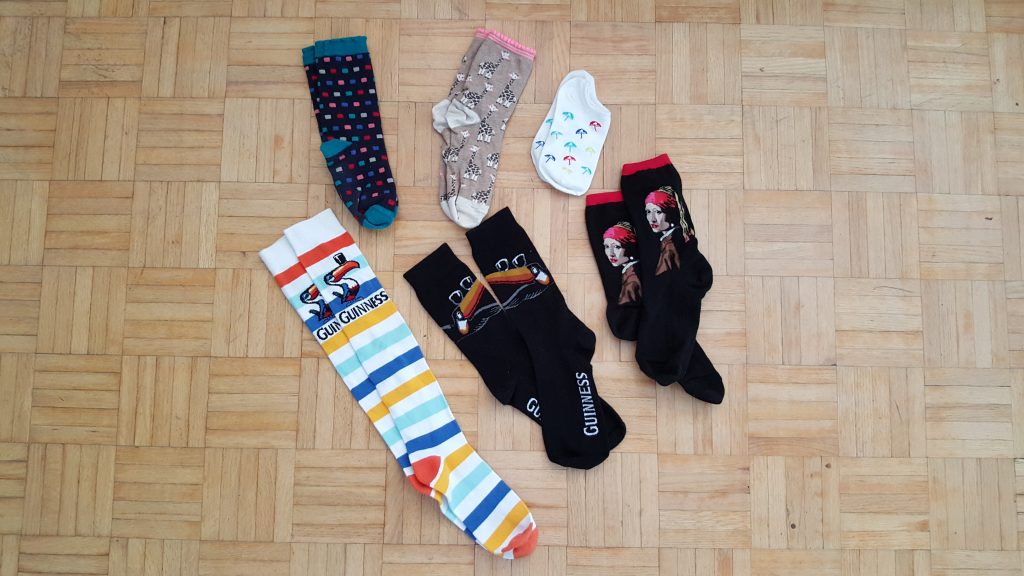
The newest additions to the sock drawer.

The newest additions to the sock drawer.


I LOVE having fun, fresh socks to wear.  And since most of my favorite pairs were given to me as gifts I have a hard time parting with them (sentimental reasons).  One time I had a black pair with moose on them given to me by one of my favorite people in the world.  Even when the heels ripped open and the toes started to wear thin I put them on over a base pair just to keep them a little longer.

Since I know socks are one of my harder things to purge, I decided to try out my mom’s strategy.  I dumped all my socks onto the bed and plucked out my favorites.  It was fast and easy to review the sock pairs and select the ones I loved best to keep.  Then I moved onto the “maybe” pairs and swiftly processed them into one of three piles: Keep, Trash, Donate.  The rest were all donated, unless they didn’t make it through the quality assurance test.

I ended up throwing out 4 pairs in sad condition, donating 13 pairs, and changing my mind about 2 pairs.  One pair was too ratty to donate, but could still be worn a couple more times, even without a base layer.  And the other pair belonged to my father, again sentimental reasons.

Psychologically, I enjoyed selecting my most favorite things to keep and then purging the rest.  Somehow it felt nicer and easier than selecting things to purge, even though I accomplished both in the end.
 

Nature Hates a Void

A short time ago I was tidying up some things in my bathroom for a party I was hosting.  I decided to remove some things from one of the open shelves to make sure nothing got accidentally bumped off by my guests.  Even though my bathroom has a perfectly useable and empty medicine cabinet with a door on it, I refused to use it. Instead I elected to store the items in a box which I stashed in my bedroom.  It seemed funny to me that I remained committed to not using the empty cabinet even though it would have been very temporary.

When I moved in I decided to remove the medicine cabinet, even though it’s still on the to-do list.  I’ve actually found it’s quite handy for visitors to place their toiletries when they stay over.  However, I’m quite strict about using it for myself.  My feeling is that once I “move in” it’s just going to become another space I’ll end up filling over time.

After graduating, one of my first jobs required me to clean up 60+ years of backlog for the directors’ offices at a public library.  This included files for all past and present directors from the last 6 decades.  The records clerk and I processed the files with great gusto, destroying some and sending others onto the city archives.  In about 6 months we had reduced the volume to 1/3 of its original size.

When I do this kind of work, people are always extremely appreciative and then immediately start to wonder about how to prevent future accumulations. One of my less conventional recommendations is to remove half the shelving, thereby forcing people to run out of space faster and address their growing pile of files more regularly.  If the space is there, you will fill it.

This strategy will also work with digital files.  Tired of accumulating so many digital photos and electronic documents?  Limit your storage space rather than always buying more to accommodate a bunch of digital files that you probably don’t even remember, will never look at again, and bring you no value.  As an added bonus, you will also save time with upgrades, migrations, and backups.

Tip: keep your electronic and physical possessions lean and mean by restricting your space and forcing yourself to use what’s available to store your things. Save strategically.

Making Space

When I selected “The Deletist” to be the name of my blog, I had a minor concern that people might think I was all about destruction.  However the message of The Deletist is not about destroying things, but rather emphasizes the merits of saving strategically.  This enables us to focus our time, money, and energy on the things that matter to us.

Whenever I feel like something is not going well in any aspect of my life (e.g. health, relationships, finances, career, etc.), the first thing I do is purge.  Getting rid of things that no longer bring me value is my symbolic way of making space for new things to come into my life.  And the purging doesn’t necessarily have to be related to the part of my life that is not working well.  For example, if I feel like my health is not 100%, I don’t focus on the bathroom or whatever areas I identify as being related to my health.  I just start somewhere, anywhere.  It could be the fridge, my storage unit, or even the coat closet.

My purging projects are not restricted to physical items.  I will often go through my contact lists in email or on social media apps to make sure the connections are worthwhile to me.  The other week I revisited my LinkedIn connections and removed 20 that weren’t beneficial.  Although I can add an infinite amount of people on LinkedIn, I prefer quality over quantity and focus on making mutually favorable connections.

When I elect to make space, I perceive any small advance as being productive.  From my experiences, I know that sometimes people have challenges finding a starting point because the activity as a whole seems overwhelming or too time consuming.  That’s why I sometimes start with a single drawer or shelf.  It’s small and easy to get through, fills me with confidence, and provides a boost of motivation.

To me, purging things is about creating opportunities for new things to come into your life.  And that starts by making space for them.  Once you create space, be mindful of how/why you’re using it so it doesn’t get filled up with junk as you’ll read about in next week’s post, Nature Hates a Void.

Clearing Out Clutter

Clutter means a lot of different things to people.  However, when I see piles of clutter and build up, I always equate it to energy flow.  To me accumulated piles of stuff represent stagnant energy, or a blockage, in one form or another.  Sometimes the “fix” is as easy as rearranging furniture, getting rid of something, or committing to finish something that’s been lingering on the to-do list.  Other times the “fix” can be more complex. Either way, I use clutter as a diagnostic tool to figure out what’s really going on.

I became interested in feng shui some years ago.  Admittedly I don’t really know or understand that much about it, but what I remember is that certain areas of the home represent different areas of our life (e.g. finances, health, relationships, career, etc.).  Having and maintaining a good flow of energy in each area is integral for us to remain balanced and happy in our lives.  Armed with this minimal understanding of feng shui, I started applying it to my home and my professional career.

A few years ago I noticed that I wasn’t being creative (i.e. playing my instrument and writing).  I took a long hard look at my designated “creative area” and immediately saw the problem.  Somehow my creative space had turned into a dumping ground for my junk.  I couldn’t even see my desk anymore.  I sorted through the chaos and then relocated my “creative area” to a different spot in the apartment.  Not only did I start to feel creative again, but the desk never accumulated clutter the way it had in the previous area.

Even in my professional career I’ve observed correlations between the well-being of the employees and the amount of stuff lying around their work areas.  For example, one department I worked with had huge volumes of files, boxes, and binders piled up everywhere.  They also had a high turnover rate and employees were always trying to transfer out.

Tips:

  1. Observe if you have any piles of clutter and build up stagnating in your home (or work place).
  2. Figure out what those areas represent to you in your life.
  3. Assess what’s causing the energy blockages.
  4. Change something, anything.
  5. Try out the new changes and keep adjusting until you feel satisfied.

Homes and work places are dynamic environments that may require changes over time to accommodate ever-changing needs.

Agreeing to the Apps

Setting up my new smartphone required me to reinstall many of the apps I had grown fond of using.  I suppose the first time I set them up I blindly agreed to the 30 page terms of service and granted permissions for access to whatever was listed.  This time, however, I took a longer look at what the app was asking permission to access.  Some of them had long lists and included parts of my data that I couldn’t even conceive what the app would use them for.  Even more troubling, is that you can’t opt out of any of the requested permissions in order to use the app.  It’s ALL or nothing.

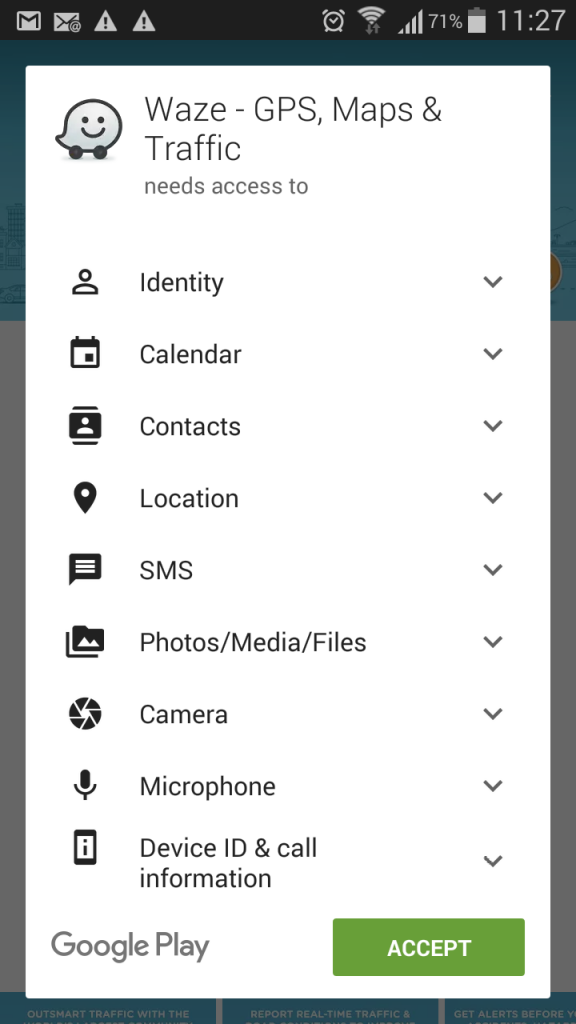
Below is a screencap for all the things on my phone that Waze, a community-based traffic and navigation app, needed permission to access.

Waze App Permissions

Only some of the permissions seemed self-explanatory for a traffic and navigation app.  Some of the access permissions I could understand immediately such as the microphone to allow for voice-activated commands while driving, the location details, and even contacts to coordinate arrivals at events.  But I couldn’t figure out the requested access to Photos/Media/Files, SMS, and Calendar.  I suppose you might want to integrate the calendar with the app to seamlessly transfer location information.

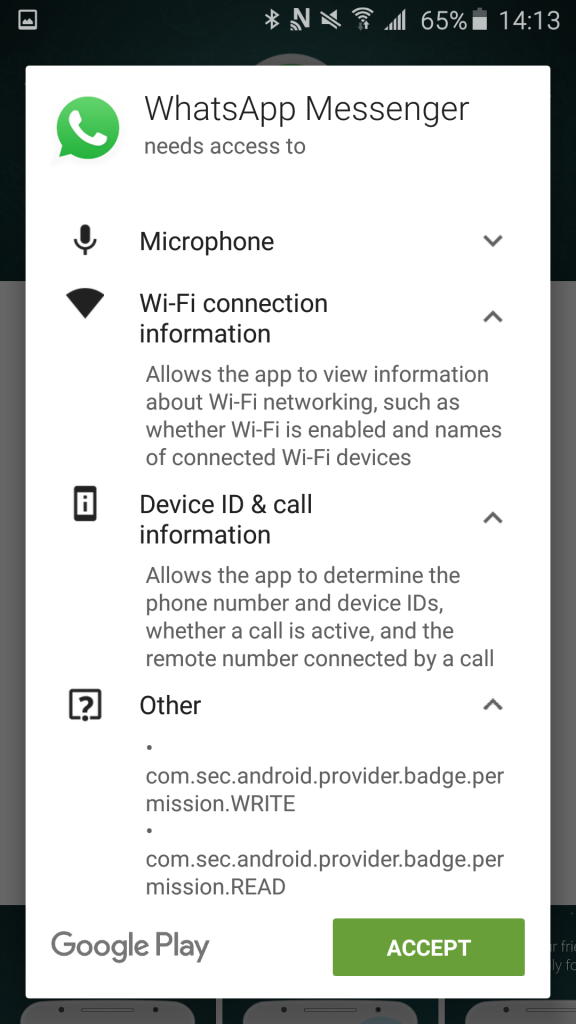
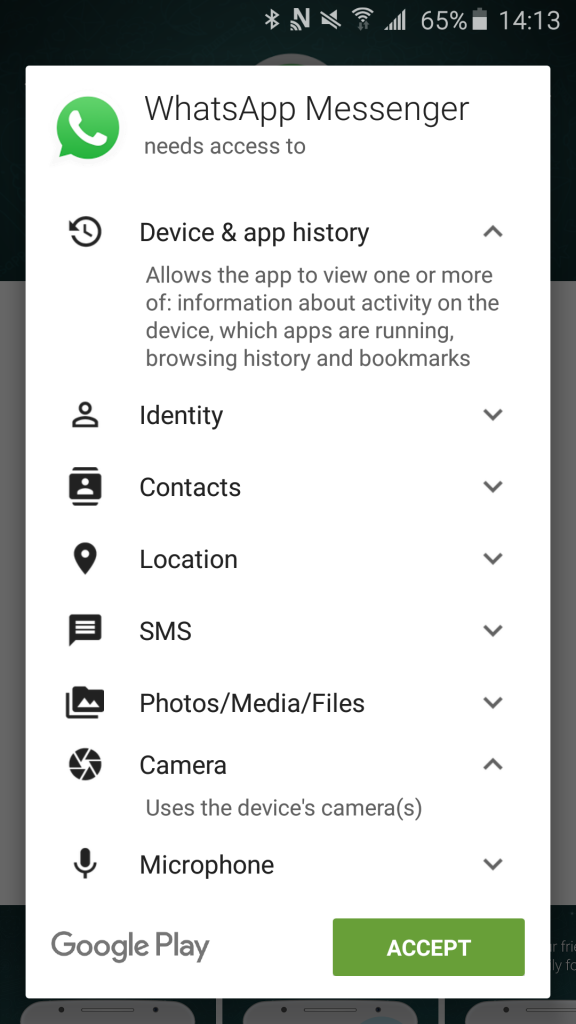
Below are two screencaps for permissions requested from the WhatsApp Messenger.  The list was so long I had to capture it in two separate pieces. I also expanded some of the descriptions to try and figure out what the app intended to do with the access.

WhatsApp Messenger I

WhatsApp Messenger II

Of course I accepted everything so I could use the silly thing, but I found some of them really puzzling.  Why does WhatsApp need to access my “Device & app history”?  Or what about “Device ID & call information”?  I also found the “Other” permissions particularly alarming especially since they seem to be written in IT-ese, or some other foreign technology language.

Admittedly, I feel torn.  I want the convenience and perks of using the apps, without losing control and constantly wondering “what are they going to do with all that data?”.  It feels invasive.  What are we agreeing to when we ACCEPT?  I’m in favor of seamless integrations and automation, but I also want to understand how it’s happening and be able to decide which data is being used for what purpose.

Technology Transitions

After my unanticipated dunk in the lake with my smartphone (available here), the rice did not work as well as I had originally thought.  Thankfully all the data was restored and accessible, but the camera never worked again.  Selecting the camera icon resulted in a black screen that consequently caused other weird things to happen. Also the battery only lasted about 5 hours, max.  Even when turned off, the battery was still draining itself.  I figured it was just a matter of time before something disastrous happened.

I know some people are constantly upgrading and switching their devices for the latest and greatest.  However, I like to set everything up and then use it for as long as possible (basically until the device breaks or becomes too outdated).

The smartphone is newer so it has a few different capabilities from the previous model and some of the settings behave differently.  Some of the integration options are different, or no longer available, resulting in lots of Google searches. I’m still figuring out what it can do and where everything “lives”.  For example, if I want the timer to sound an alarm, the ringer must be turned on for everything in the phone.  Since I use the timer when I meditate, I don’t want the phone tweeting and chirping for anything except the end of the timer.  I’m also a little bit sad the new model doesn’t come with the same default seagull-ocean ring tone.

The transition was not as smooth as I had anticipated despite the fact that my phone hardly contained any unique content.  For example, most of my pictures were available in other places and my contacts were all in gmail.  Naturally I was quite surprised when I logged in and the contacts didn’t just appear.

Even worse, the manager at the shop attempted to move all my contacts from one phone to the other through a bluetooth connection.  The end result was hundreds of contacts appearing, full of duplicates (many of which had to be adjusted manually) and all kinds of weird email addresses that I had used maybe once a long time ago.  I’m still figuring out which settings control this kind of thing.

Obviously I need to invest more time learning how to backup everything, including the apps, so I don’t have to reinstall everything if something else happens.